TEI for Transcriptions: A Beginner's Workflow from Diplomatic Text to Valid XML
A beginner's workflow for encoding transcriptions in TEI XML. It covers when a project needs TEI, the core elements for pages, lines, abbreviations, errors, gaps and corrections, a worked example, and how to validate and publish the result.
Leo Team
October 4, 2026

Contents
TEI transcription means encoding a transcription in XML following the Text Encoding Initiative's Guidelines, so that every editorial decision (an expanded abbreviation, a doubtful reading, a deleted word) is recorded in a form both people and software can read. This guide covers when a project needs TEI, the dozen elements that do most of the work, a worked example, and how to validate and publish the result.
Most transcriptions start life in a word processor, with square brackets, question marks and strikethroughs standing in for editorial decisions. That works until someone else has to use the text. As the Leo Academy Handbook notes, square brackets mark supplied letters in one edition and deleted words in another. TEI replaces those private signs with named elements: a deletion is <del>, an editor's expansion is <expan>, an uncertain reading is <unclear>. Nothing has to be guessed from typography.
TEI encoding is one stage of a wider historical research workflow: it comes after you have images and a faithful transcription, and before publication or analysis.
What TEI is
The Text Encoding Initiative is a standard for representing texts in digital form, maintained by the TEI Consortium, a nonprofit membership organisation of institutions, projects and scholars. Its rules are the TEI Guidelines (P5), published as open source with their schemas. The current release at the time of writing is P5 version 4.12.0, updated in July 2026.
A TEI file is an XML file. Text is wrapped in elements written in angle brackets, such as <del>lower</del>, and attributes add detail, such as <del rend="strikethrough">. A transcription project uses only a small subset of the elements, and the chapter on Representation of Primary Sources covers most of what manuscript work needs.
Does your transcription project need TEI?
TEI is worth the learning curve when the transcription has to outlive you, or be read by software:
- A scholarly or digital edition, where readers need to see every intervention and switch between a literal and a reading text
- A corpus for analysis, where you want to count abbreviations, search only the scribe's words, or exclude editorial additions
- Long-term deposit, where an open, documented format will outlast a .docx file
- A team project, where several transcribers must mark the same things the same way and a schema can check them
It is probably more than you need when the transcription is for your own research notes, a family history, or a one-off quotation in an article. A carefully written Word or PDF transcription with a stated key of conventions serves those well. You can always encode later, as long as the original transcription kept what was on the page.
TEI encodes what a document says, not what a collection holds. The layered guide to archival metadata standards shows where it sits beside EAD and PREMIS.
Step 1: Decide your conventions before you encode
TEI does not decide anything for you. It gives you a precise way to record decisions you have already made. Before you write any XML, settle three questions and write the answers down:
- How literal is the base text? A diplomatic transcription keeps the spelling, abbreviations, line breaks and alterations of the page. Most TEI projects encode at this level and add normalised readings alongside.
- What will you expand, and how? Decide whether every abbreviation gets an expansion, or only some, and whether superscript letters such as yᵗ for that are recorded as superscript. Our guide to manuscript abbreviations covers the main types.
- What units will you mark? Pages and lines almost always; sometimes columns, hands, marginal notes or damage.
Record the answers in the header, so a later reader knows what your <expan> elements mean.
The skeleton of a TEI file
Every TEI document has the same outline. The root element is <TEI>, declared in the TEI namespace (http://www.tei-c.org/ns/1.0). Inside it are two parts:
- <teiHeader>, the metadata. In the Guidelines' words, it "supplies descriptive and declarative metadata" about the file.
- <text>, which holds the transcription itself, usually inside <body>
The header can grow large, but only one part of it is mandatory: the file description, <fileDesc>. It must contain three things:
- <titleStmt>, with a <title> for the electronic text
- <publicationStmt>, saying who publishes or distributes it, even if only "unpublished working file"
- <sourceDesc>, describing the original: repository, shelfmark, folio, date
As the project grows, add an <encodingDesc> to record your conventions, and for manuscripts a full <msDesc> inside <sourceDesc>. A beginner can start with the three mandatory statements and fill in the rest later.
The core elements for transcriptions
These elements cover most of what appears on a handwritten page. All of them belong to the TEI's core module, which the Guidelines describe as available in all TEI documents.
Pages and lines: pb and lb
<pb/> marks the beginning of a page and <lb/> the beginning of a line. They are empty "milestone" elements: they mark a point rather than wrap text, which is why they end with a slash. Number them with n, and point a page break at its image with facs: <pb n="3" facs="folio-003.jpg"/>. When a word is split across lines, <lb break="no"/> records that the new line does not begin a new word.
Abbreviations: choice, abbr and expan
<choice> "groups a number of alternative encodings for the same point in a text". For an abbreviation, the two alternatives are the abbreviated form as written, <abbr>, and your expansion, <expan>:
<choice><abbr>recd</abbr><expan>received</expan></choice>
The file keeps both. A display can show either, and nobody has to wonder whether "received" is what the scribe wrote. For finer work, the transcription module adds <ex> and <am>: <ex> marks the letters an editor supplied in an expansion, and <am> the abbreviation mark that the expansion replaces.
Apparent errors: sic and corr
<sic> contains "text reproduced although apparently incorrect or inaccurate". <corr> contains your correction. Wrapped in <choice>, they keep the slip and the fix side by side: <choice><sic>the the</sic><corr>the</corr></choice>.
Use them for genuine slips, such as a repeated word or an impossible date. Early modern spelling is not an error. Variant spelling belongs to normalisation, covered below.
Uncertain and missing text: unclear and gap
<unclear> wraps text you have transcribed but cannot read with certainty. Add reason (faded, damaged, blotted) and cert (high, medium, low or unknown) so readers know how far to trust it.
<gap/> marks text you have not transcribed at all, because it is illegible, lost or deliberately left out. Say why and how much: <gap reason="illegible" quantity="2" unit="word"/>. If you supply missing text from another source or from context, <supplied> holds it and makes clear the words are yours.
The writer's own changes: add and del
<add> holds letters or words inserted by the author, scribe or a later corrector, with place saying where (above, below, in the margin). <del> holds what they struck out, with rend saying how (a line through it, overwriting, erasure). These record changes made on the page by the people who wrote it; your own corrections go in <corr>, never in <add>.
Visual distinctions: hi
<hi> marks text that is "graphically distinct from the surrounding text", without claiming why. Use rend to say how it looks: superscript, underlined, larger, in red. In manuscripts its most common job is the raised letters of abbreviations such as Mʳ or yᵉ.
A worked example: encoding a short receipt
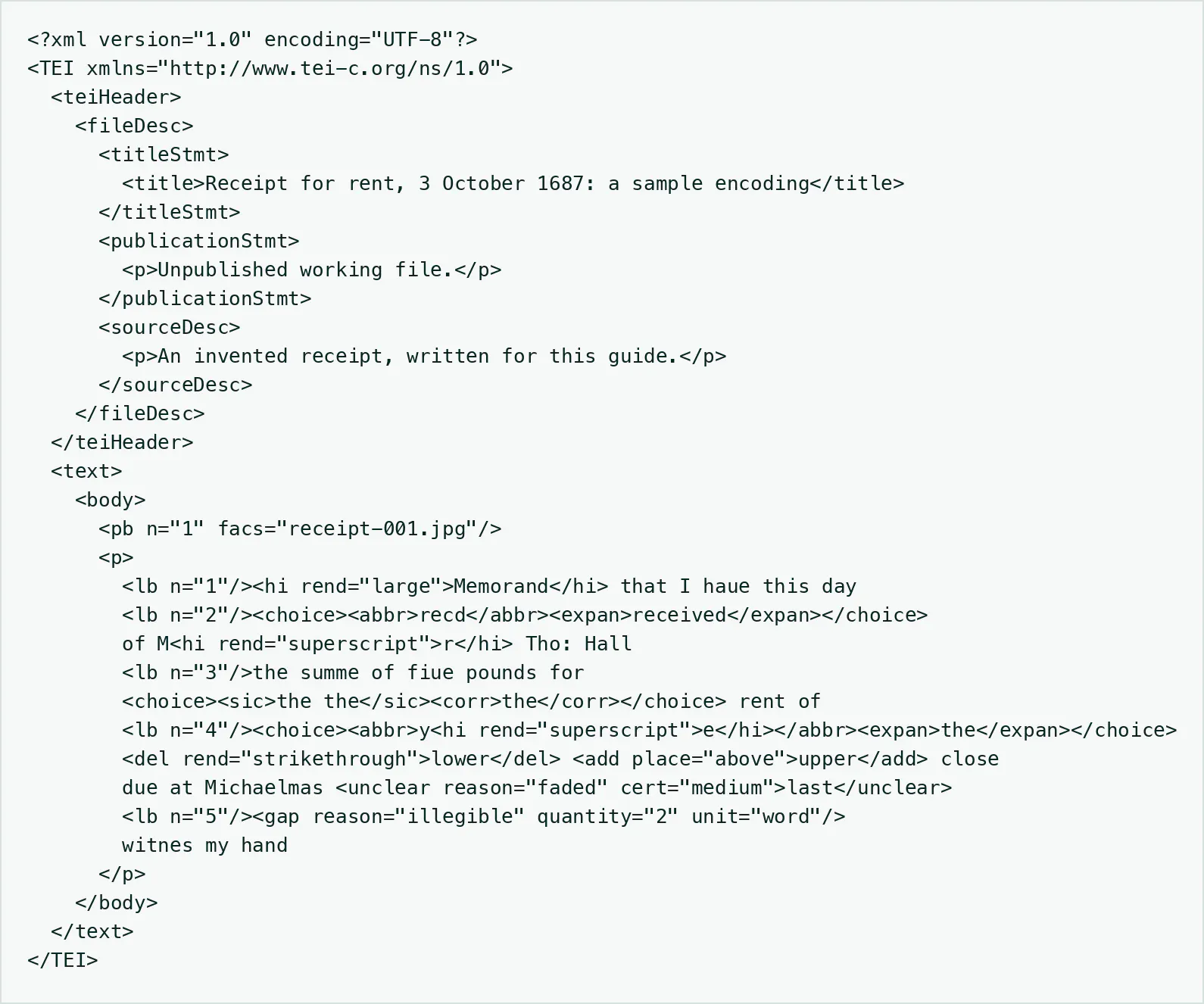
The receipt below was invented for this guide, as a short late seventeenth-century English text with the features a beginner meets most often. As a diplomatic transcription in plain text, with ⟨ ⟩ around a struck-through word and \ / around an insertion above the line, it reads:
Memorand that I haue this day | recd of Mr Tho: Hall | the summe of fiue pounds for the the rent of | ye ⟨lower⟩ \upper/ close due at Michaelmas last [?] | [2 words illegible] witnes my hand
Here is the same text encoded in TEI:
What each choice records:
- The header has only the three mandatory statements. In a real project, <sourceDesc> would give the repository, reference and folio.
- <pb> and <lb> keep the page and its five lines, and facs ties the page to its image file
- "recd" and "ye" are kept as written inside <abbr>, with expansions in <expan>. The raised e of yᵉ is recorded with <hi rend="superscript">.
- "Tho:" is left unexpanded. Leaving a form as written is as honest as expanding it, provided your conventions say so.
- "the the" is a scribe's slip, so it gets <sic> with a <corr>
- "lower" struck through, "upper" written above are the writer's own change, so <del> and <add>, not <corr>
- "last" is a probable reading of faded ink, so <unclear> with a reason and a certainty
- Two illegible words are a <gap> with a reason and a count, not a guess
- "haue", "summe", "fiue" and "witnes" stay as written. They are the spelling of the period, not errors.
This file validates against the TEI's full schema and against TEI Lite.
Diplomatic and normalised readings in one file
TEI does not force you to choose between a literal text and a readable one. The same <choice> mechanism that pairs an abbreviation with its expansion pairs an original spelling with a modern one, using <orig> and <reg>:
the <choice><orig>summe</orig><reg>sum</reg></choice> of <choice><orig>fiue</orig><reg>five</reg></choice> pounds
The file now holds two texts. A display set to "diplomatic" shows <abbr>, <sic> and <orig>; a display set to "reading text" shows <expan>, <corr> and <reg>. Both come from one source, so they can never drift apart. This is the layered approach our guide to historical language normalization recommends, expressed in markup.
Encode normalisation only where it serves a purpose, such as search or a reading edition, and record your rules in the header. If you are collating several witnesses of one text, TEI's critical apparatus chapter takes the same approach further, and our guide to comparing manuscript versions explains why each witness needs its own faithful transcription first.
Validate the file
An XML file can be well formed (every tag closed, properly nested) and still not be valid TEI. Validation checks the file against a schema: that <choice> contains what it should, that the header has its mandatory parts, that no element is misspelled.
Choose a schema. Among the customizations the TEI Consortium provides:
- TEI Lite is "the most widely used TEI customization", a subset with the basic elements for simple documents
- TEI simplePrint is an entry-level customization for Western European early modern printed material
- tei_all includes all the TEI's modules. It is permissive, which is useful while you learn and less useful for catching inconsistency.
For a team project, the better route is a customisation of your own that allows only the elements your conventions use. The TEI's web tool Roma generates one, as a schema plus documentation.
Choose a tool. Oxygen XML Editor's TEI support is a widely used choice: it includes the TEI schemas and stylesheets, suggests the elements that fit as you edit, validates documents, and offers a word-processor-like visual view. It is commercial, with a trial. Alternatively, any XML-aware text editor can be paired with a command-line validator such as Jing, a RELAX NG validator in Java, or xmllint, a free command-line tool that many systems already have. The TEI publishes its schemas in RELAX NG, the format both tools read. The TEI's own tools page lists further options, with the caution that the TEI does not endorse tools it does not maintain.
Then check the content. A schema cannot tell you whether a reading is right; that still means comparing the text against the image, as in our method for verifying transcription accuracy.
Publish the edition
Readers need a display, not raw XML. The main routes:
- Convert with the TEI stylesheets. The TEI maintains open stylesheets, listed on the TEI tools page, that convert TEI to HTML and other formats. The same page lists TEIGarage, a conversion service that also turns Word files into TEI and back.
- TEI Publisher. An open-source "working environment for creating and publishing of digital scholarly editions", inspired by the TEI Processing Model. It is not a commercial project, and much of its development comes from volunteers and the e-editiones scholarly community.
- EVT (Edition Visualization Technology). An open-source tool designed to create digital editions from TEI-encoded texts, so that scholars can publish without writing web code.
Whichever you choose, keep and deposit the TEI files themselves: the XML is the durable record, and the website is one view of it.
Where Leo fits
TEI encoding is only as good as the transcription underneath it: if the base text has been tidied, no markup can recover what the page said. For many projects the slow part is not the XML but producing a faithful transcription of hundreds or thousands of images.
Leo is built for that stage. Its transcription model, ATR-1, is specially tuned for historical documents and trained to transcribe what is on the page rather than normalise it. Spellings, capitals and abbreviations stay as written, not quietly modernised the way general-purpose AI models tend to do, which is exactly the diplomatic base a TEI edition needs. ATR-1 reads the image at high resolution, where general models downsample it, and needs no training on your scribe's hand. Built-in failure detection hides output that looks wrong, retries it, and refunds the credit if it cannot succeed. The errors that get through are the recoverable kind: a wrong letter or word that you check against the image shown beside the text.
The workspace fits an encoding project:
- Correct in place. The editor beside each image has strikethrough and superscript formatting, and every correction you make feeds back into training, so later readings improve.
- Keep the layers apart. The Modernize Transformation writes a modern-spelling version into its own tab, to consult when you add <reg> readings. The faithful transcription is never overwritten.
- Record the source. Each document carries metadata fields, among them Title, Creator, Date, Archive, Collection, Box, Folder, Identifier and Rights, the information your <sourceDesc> needs.
- Export to TEI. Text exports to TEI (XML), as well as Word, PDF and HTML. You choose which tabs and images to export, with an option to preserve line breaks.
Treat the export as the starting point for encoding, not the finished edition. Before you build a workflow on it, export a sample of a few images and open it in your XML editor. Check four things: which elements it uses for pages and lines; what it puts in the header, and whether your metadata fields appear there; how your editor formatting, such as strikethrough and superscript, comes through; and whether it validates against the schema you have chosen. Then add the editorial markup your conventions call for, such as <choice>, <unclear> and <gap>, in your XML editor.
Leo has a free plan, so you can transcribe a few images, export them to TEI and see how the file fits your project before you commit.
Frequently Asked Questions
What is TEI transcription?
TEI transcription is a transcription encoded in XML following the Text Encoding Initiative's Guidelines. Instead of brackets and typographic signs, it uses named elements for editorial decisions: <abbr> and <expan> for an abbreviation and its expansion, <unclear> for a doubtful reading, <gap> for illegible text, <del> and <add> for the writer's deletions and insertions. Readers and software can then tell what is on the page and what the editor supplied.
Do I need to know XML to use TEI?
You need the basics: elements, attributes, nesting and closing tags. An XML editor that checks the file and suggests the elements that fit at each point does much of the rest. Start with the header and a dozen elements for pages, lines, abbreviations, errors, uncertainty and the writer's changes, and add others only when your documents need them.
How do you encode abbreviations in TEI?
Wrap the abbreviation and its expansion in <choice>: <choice><abbr>recd</abbr><expan>received</expan></choice>. The file keeps both, and a display can show either. Raised letters can be recorded with <hi rend="superscript">. State your expansion policy in the header.
How do you validate a TEI file?
Check it against a TEI schema: TEI Lite, TEI simplePrint, the full tei_all, or your own customisation made with the TEI's Roma tool. Use Oxygen XML Editor, or a free command-line validator such as Jing or xmllint with the TEI's RELAX NG schemas. Validation checks the markup, not the reading, so still compare the text against the image.
Can Leo export transcriptions to TEI?
Yes. Leo exports text to TEI (XML), as well as Word, PDF and HTML, and you choose which tabs and images to include. Its ATR-1 model keeps the page's spelling and abbreviations rather than modernising them, which gives you a faithful base for encoding. Export a sample first and check which elements it uses, what goes in the header and whether it validates against your project's schema, then add your editorial markup in an XML editor.